
Transaction lifecycle
An immediate transaction is a direct request to pay a recipient as soon as possible. The transaction progresses through various phases before it is executed. For more information, see Transaction Processing Phases.
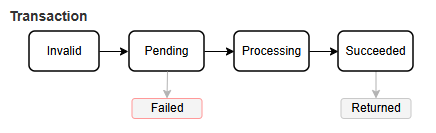
As the transaction progresses, the transaction status updates until it reaches a terminal state.
Checking the current transaction status using the API
Send:
GET /transactionRequests/{id}
To check the current status of a transaction, retrieve the transaction request using its ID.
For more information, see Retrieve a transaction.
You can also monitor transaction outcomes using webhook notifications.
For more information, see Webhooks.
Transaction states
| Status | Description |
|---|---|
Invalid | The transaction request has been created but has not yet passed validation checks. |
Pending | The transaction has passed validation (where checks are made for errors or missing data) and was accepted. |
Processing | The transaction is being processed and was submitted to the banking network. |
Succeeded | A terminal state. The transaction completed successfully. For most payment types, funds were paid out. For postal cheque transactions, this indicates the cheque was dispatched. |
Failed | A terminal state. The request contains errors or is missing required data and cannot proceed. See FailureReason or the transaction events for more information. |
Returned | A terminal state. The transaction completed successfully but was later reversed or rejected by the receiving bank or payment system. |
CancellationRequested | A cancellation request was received and is awaiting completion. |
Cancelled | A terminal state. The transaction was cancelled before processing completed. |
The following statuses apply only to deferred transactions and are not covered in this guide: Queued, DeQueued, PendingGrouping, and PendingPayment.
Updated 4 months ago