
Account access
Account access controls which accounts are available to users and integrated applications.
Organisations can manage access to their own accounts, or share selected accounts with partner organisations through delegated access. The partner organisation then grants its own users access to the shared accounts.
For example, a Carrier may want to delegate accounts to a TPA, to support claims administration. The TPA chooses which of its users have access to those shared accounts.
Typical delegated access relationships include:
| Account owner | Partner organisation |
|---|---|
| Carrier | TPA, Broker |
| TPA | Carrier, Broker |
| MGA | TPA, Broker |
| Capacity provider | MGA, Broker |
Currently, Vitesse configures delegated account access between organisations during the customer onboarding process for both Vitesse online and MAS.
How you configure user access to accounts depends on whether you use Vitesse online or MAS.
Understanding delegated account access in Vitesse online
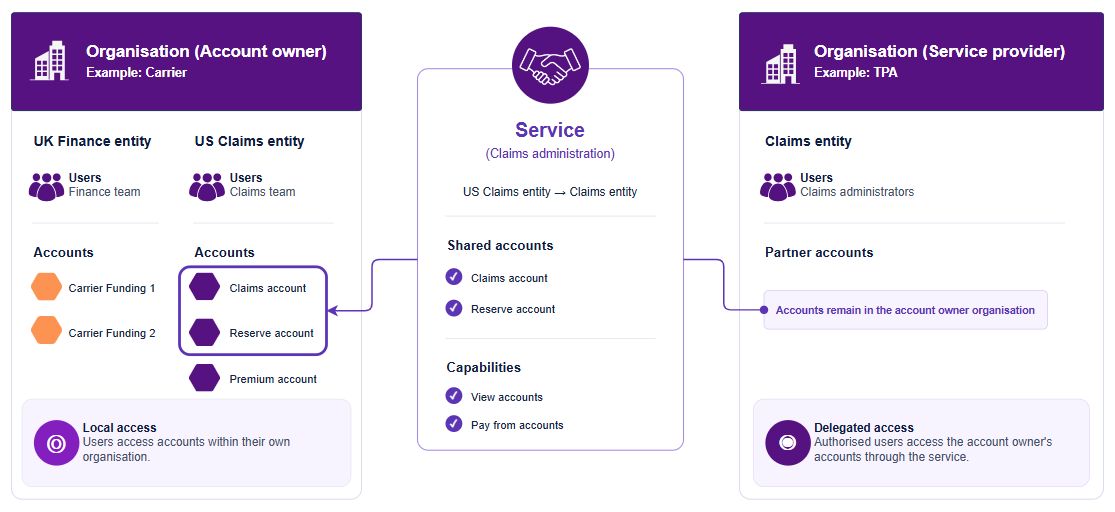
Vitesse uses services to delegate account access between organisations.
Within a service:
- The account owner is the organisation that owns and controls the shared accounts.
- The service provider is the partner organisation that receives delegated access.
A service links an entity in the account owner's organisation with an entity in the service provider's organisation.
The account owner selects the accounts to include in the service and defines the delegated access available to the service provider.
The accounts stay with the account owner. The service grants access, it does not transfer ownership.
The service provider assigns the shared accounts to its users.
For example, a Carrier may delegate selected accounts to a TPA:
For information about organisations and entities, see Organisations and entities.
Contact Support to configure services.
Managing user access to accounts in Vitesse online
In Vitesse online, organisations can administer user access to their own accounts.
They can also administer user access to accounts that a partner organisation has shared with them.
For more information, see Manage account access.
Understanding delegated account access in MAS
In MAS, Vitesse configures delegated account access by linking the participating merchants and the accounts they will share.
Authorised users can access linked accounts to make payments, perform account movements, generate reports, and carry out other supported operations.
Managing user access to accounts in MAS
Vitesse manages account access in MAS.
For more information, see Manage accounts.
Updated 3 months ago