
Make a single payment
This feature is in pilot with some customers. If you're interested, contact your Vitesse Representative or Support.
Use Single Payment to send a payment via Payee Choice. The recipient receives a payment link, uses the link to access a secure form, where they can choose how to receive their payment, for example by bank transfer or check (US only), and enter their payment details.
Every payment is defined by a Programme, which configures and controls the recipient payment experience.
Get started
-
On the Payments page, select Single Payment.
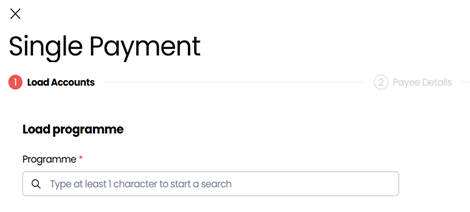
The payment process has multiple steps. You can return to any completed step using the navigation at the top of the screen.
Load Accounts
Select a Programme and enter the basic payment details, including the amount, currency, and how the recipient receives the payment.
-
Select the Programme for this payment.
This controls which accounts and delivery options are available.Speak to your administrator for information about which Programme to select.
-
Select which source account to send the payment from.

-
Select the Receive Currency, which is the currency that the recipient is paid in.
-
Enter either a Send Amount or Receive Amount:
Send Amount – the amount you want to send from the selected account
Receive Amount – the amount the recipient will receive in their currencyWhen entering one amount, the other amount is automatically estimated using the current exchange rate. Final values are set when the payment is processed, after the recipient has accepted it and entered their details.
-
Enter a Payment Description up to 250 characters, which is a brief description of what the payment is for.
This will help the recipient to verify the payment before they accept it. -
Select the Recipient Country, where the recipient resides.
-
Select one or more Payment Methods, which are the options the recipient can choose from to receive the payment.
-
Select Next.
Payee Details
Specify the recipient's communication details. Depending on the selected Programme, you must include at least one trust method to help the recipient confirm that the message is legitimate. A Passphrase is required if this is the authentication method defined in the Programme.
- Confirm who will provide the payment details.
Currently, the only option is preselected: Payee provides details. - Select the Payee type, either Personal or Business, based on the recipient's account type.
- Enter the recipient's name and contact details.
- Enter the Recipient Reference, which is the reference that appears on the recipient's bank statement.
- Enter one or more required Trust methods.
These are configured in the Programme (such as a claim number or policy reference), and will appear in recipient communication. - If prompted, enter a previously communicated passphrase.
- Select Next.
Review
Review the payment details before submitting.
- Check that all details are correct.
- To edit a section, select Load Accounts or Payee Details in the payment journey header.
- Select Next.
- Select Make payment to validate your payment.
At this point, the recipient receives the email with a secure link to acccept the payment, choose how they want to receive the funds and enter their details.
Updated 4 months ago