
Queued deferred transactions overview
Legacy API. This topic describes our original API. If you are integrating with Vitesse, use Vitesse API instead.
It's a bit of a mouthful, but this is a combination of both a deferred transaction (where you send us the money to release the transaction) and a queued transaction (that is paid to a recipient on a specified day).
The first two phases of a QDTX are the same as those for a regular deferred transaction - they are added to a "pool" of transactions, then at some time later you group them together. We do the same validity checks on deferred transactions, and assuming they are valid they then go into the "pool" of outstanding transactions.
When you send us a QDTX, you need to specify three additional values on the API call. These are outlined below, and described further in the following text.
| Field | Data Type | Description |
|---|---|---|
| RequestedValueDate | Date | When you would like the payment to be receieved by the recipient. |
| DateSearchMode | String, "Backward" (the default) or "Forward" | Which direction we look in for a working day to land the payment if the requested value date falls on a non-working day. |
| LatePaymentMode | String, "Cancel" (the default) or "Continue" | What to do if your funds don't show up in time for us to make the projected value date. |
Phase 1 - DTX added to pool
In the following, assume that a new payout request has been made to pay from USD to AUD has been added to the pool…
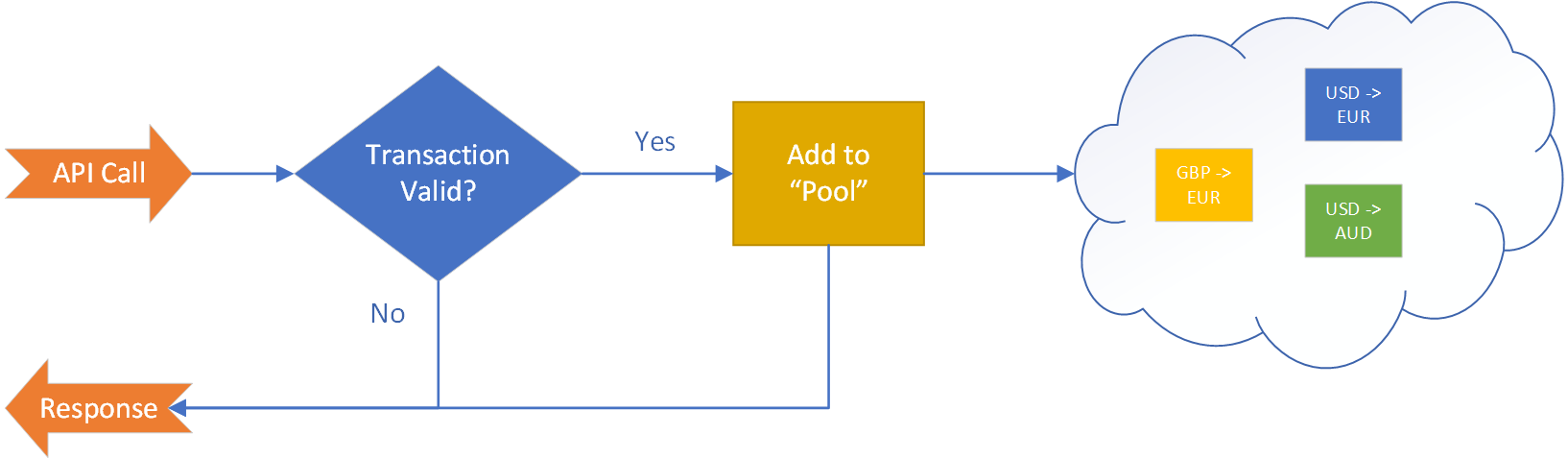
You can have zero or many transactions in this pool – nothing further happens to them until you call another method on the API to "group" transactions together. To create a deferred transaction, call the Create method on the API.
In this phase we also check the RequestedValueDate and DateSearchMode so that we can find out if we can land the payment on time. As an example, if there was a 3 day lead time for a payment to Australia, but you asked with only 2 days to go, we wouldn't be able to deliver the payment in time so would respond with an error from the API request when creating the transaction. See the documentation on regular queued transactions Queued Transaction Overview for full details of how these two values affect a transaction.
Phase 2 - Grouping
When transactions are grouped, we calculate a total amount from all the transactions in that group and also generate a group reference code. You can then deposit funds to us and, once received, we will release that group of transactions for further processing.
The following images show pictorially how this happens.
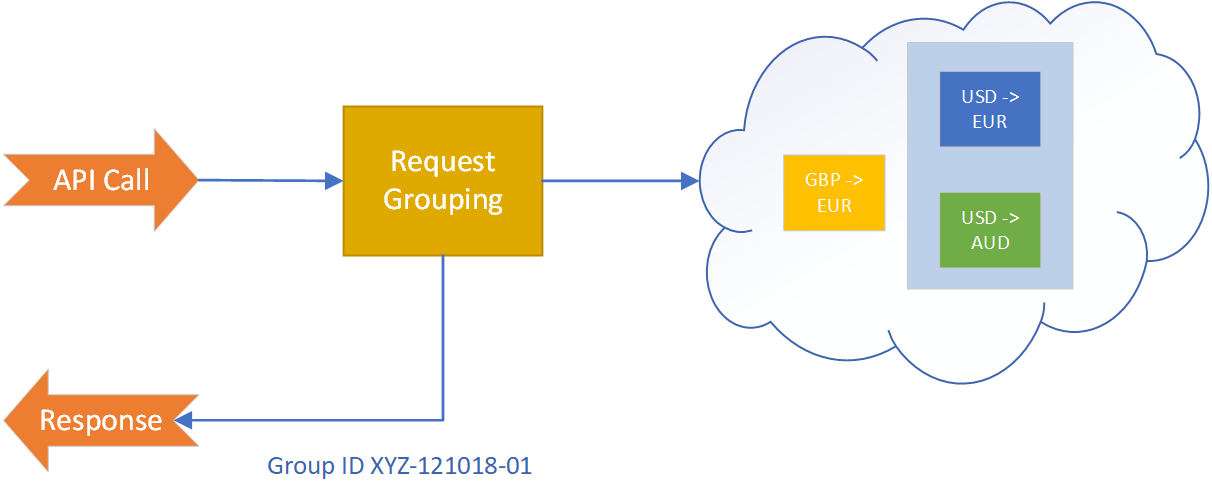
Here a request was made to group the two USD transactions together, this results in a new group being created with a unique group code, the transactions are associated with this group, and the code and total USD amount is then returned to the caller. All transactions have a sender currency and a recipient currency. When grouping, we only group deferred transactions with the same sender currency together, if you request a cross currency grouping from the API then a descriptive error message is returned. To group transactions, please call the Create Group endpoint.
Phase 3 - Release after payment
We then await funds into our USD account, and once they arrive we can release the transactions for further processing.
In the case of a QDTX, this processing is date dependant. The premise of a QDTX is that you have asked us to land a payment with a recipient on a specific day - let's say this is a salary payment and needs to be there by the 1st of the month. Whether we can get the payment there on time is dependant on (a) when you send us the transaction in the first place and (b) whether the funds arrive in time for us to make a payment in time.
The flowchart for a QDTX is as follows...
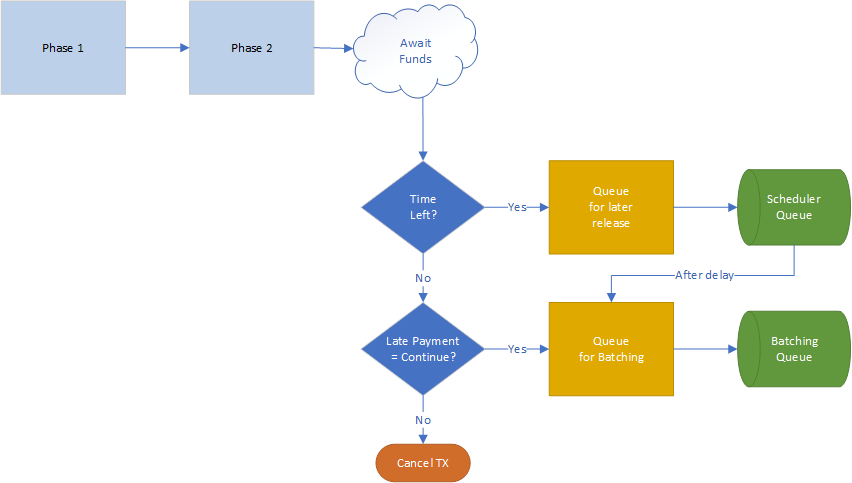
After Phase 1 (sending us the TX) and Phase 2 (grouping) we await funds from you, and once these arrive we then have to calculate whether there's sufficient time left for us to hit the value date you specified. If there is, we can then queue the transaction(s) in the group and release them at a later point for batching.
What if your payment to us is late?
If there isn't enough time left to land the transaction on the requested value date, then the LatePaymentMode value is used to determine what happens next. If the LatePaymentMode is Cancel (the default if not explicitly specified on the API call) then the payment will be cancelled and the recipient will not receive their funds. This process follows the normal notification procedure available in the system, so if you have setup callback notifications then you will receive a callback at this point.
If however LatePaymentMode is set to Continue, then we simply process that transaction as a regular transaction - it may show up later than the desired value date, but it will show up.
How are all the dates related?
There are several key milestones in the life of a QDTX that are independant but also interrelated.
Firstly there is the rate group associated with the transaction(s). This defines a hard stop for those transactions, such that if they are not queued and released by that point, those transactions will be cancelled. Typically you would setup a 5 or 7 day duration here.
Then there's the RequestedValueDate and DateSearchMode - these define when you would like the funds to arrive, and if we can't land the money on the requested value date, which direction we should look for the next suitable date. These together then determine the computation of the ValueDate, and this value is provided back from the API.
Then there may be a time delay between receiving your funds and them being available to the recipient - this is computed using data we hold in our system on the particular route that the transaction will take, and this will then be used to determine the QueuedUntil date.
We need to be paid before a QDTX is released to be queued, and that payment must reach us (and be processed) by the expiration date of the rate group. If the funds arrive early enough, we then queue the transaction, however if when the funds show up it's too late for us to make the requested value date, then we use the LatePaymentMode value to determine if the TX will simply be cancelled (the default), or procesed on a "best efforts" basis.
Updated 4 months ago