
Additional validations
Additional validations (also known as rule sets) extend the standard payment validation rules by allowing you to define custom validation requirements for specific accounts.
There are two sources of validation:
- System Rules, which are determined by the payment country, currency, and route type.
- Additional Validations, which are configured on an account.
When an account has additional validations assigned, Vitesse combines both sets of rules. Transactions are validated against the combined rule set.
If both the system rules and the additional validations define the same field, Vitesse applies the most restrictive validation.
For example, if the system rules allow ExternalReference1 to contain between 1 and 15 characters, but the additional validation restricts the field to between 1 and 10 characters, the effective allowed length is 1 to 10 characters.
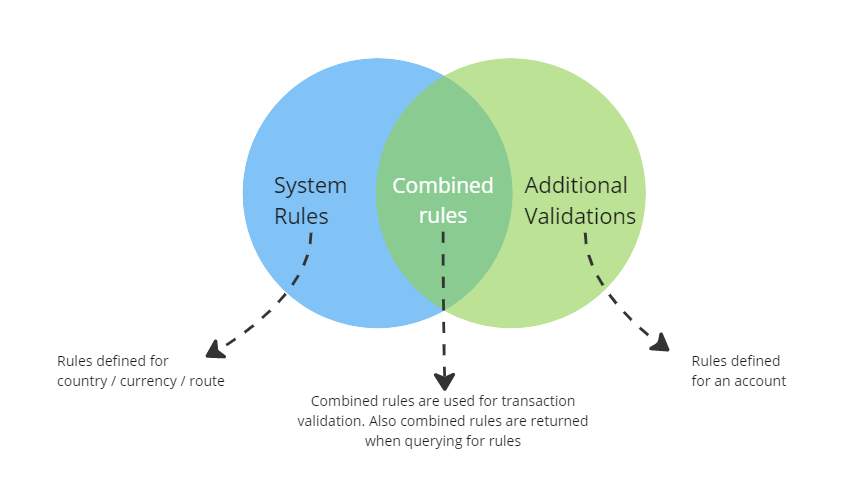
When you retrieve rules using the Rules API and supply an accountId, the response contains the combined rule set for that account. This includes both the system rules and any additional validations configured for the account.
For example:
GET /api/rules/US/USD/Cheque?accountId=700The following response example shows a combined rule set containing both system rules and additional validations.
[
  {
    "Conditions": [],
    "Field": "RecipientReference",
    "FieldName": "Recipient Reference",
    "FieldType": "Any",
    "MaximumLength": 50,
    "MinimumLength": 0,
    "Options": "Mandatory",
    "Path": "request.Recipient.RecipientReference"
  },
  {
    "Conditions": [
      {
        "ConditionType": "Allowlist",
        "Parameters": {
          "Choices": [
            "Indemnity",
            "DCA Fees",
            "Considered Fees (Total Fees excluding DCA Fees)"
          ],
          "Descriptions": [
            "Indemnity payment",
            "Debt collection agency fees",
            "Fees excluding debt collection agency charges"
          ],
          "PermitFreeformEntry": false
        }
      }
    ],
    "FieldName": "Fee Indicator",
    "FieldType": "Any",
    "MaximumLength": 64,
    "MinimumLength": 0,
    "Options": "Optional",
    "Path": "request.Extra.FeeIndicator"
  },
  {
    "Conditions": [
      {
        "ConditionType": "Denylist",
        "Parameters": {
          "DenylistId": 10008,
          "ExactMatch": true
        }
      }
    ],
    "FieldName": "External Reference 2",
    "FieldType": "Any",
    "MaximumLength": 128,
    "MinimumLength": 4,
    "Options": "Mandatory",
    "Path": "request.ExternalReference2"
  },
  {
    "Conditions": [
      {
        "ConditionType": "BlendLookup",
        "Parameters": {
          "PropertyName": "YOA"
        }
      }
    ],
    "FieldName": "Year Of Account",
    "FieldType": "Numeric",
    "MaximumLength": 4,
    "MinimumLength": 4,
    "Options": "Mandatory",
    "Path": "request.Extra.YearOfAccount"
  }
]
In this example:
- The system rules define the standard validation requirements for the selected country, currency, and route type, such as
RecipientReference. - The additional validations define extra validation for one standard field (
ExternalReference2) and two custom fields passed in theExtraobject (YearOfAccountandFeeIndicator).
Identify custom additional validation fields by the Path beginning with request.Extra..
The Conditions array defines any additional validation that applies to a field. The Parameters object varies depending on the ConditionType.
- The
Allowlistcondition applied toFeeIndicatorrestricts the field to the valuesIndemnity,DCA Fees, andConsidered Fees (Total Fees excluding DCA Fees). - The
Denylistcondition applied toExternalReference2references a system-managed list of prohibited values. The response returns theDenylistId, but not the contents of the list. - The
BlendLookupcondition applied toYearOfAccountrequires the field value to match the corresponding value configured in the account blend.
Rule condition types
Allowlist
The field can contain only the values listed in Choices.
If Descriptions are provided, they contain user-friendly labels corresponding to each value in Choices. You can use these labels when presenting the values in a user interface.
If PermitFreeformEntry is true, values outside the allowlist are also accepted.
Denylist
The field must not contain values from the denylist identified by DenylistId.
The response includes the DenylistId, but not the contents of the denylist.
If ExactMatch is true, only exact matches are rejected. For example, if the denylist contains null and N/A, values such as null and N/A are rejected, whereas nullable value is permitted.
If ExactMatch is false, values containing a denylisted term are also rejected. For example, if the denylist contains null and N/A, values such as null, N/A, nullable value, and my N/A test are all rejected.
BlendLookup
The field value must match the value of the account blend property specified by PropertyName.
Supported values are:
PropertyName | Description |
|---|---|
YOA | Year of Account |
SectionId | Section ID |
UMR | Unique Market Reference |
PolicyReference | Policy reference |
For example, if PropertyName is YOA, the value supplied for the field must match the Year of Account configured on the account blend.
Updated 4 months ago