Use Administration > Account Applications to manage existing Standard, Funding or Payment account applications and apply for new accounts.
The Account Applications list displays all account applications and their current status.
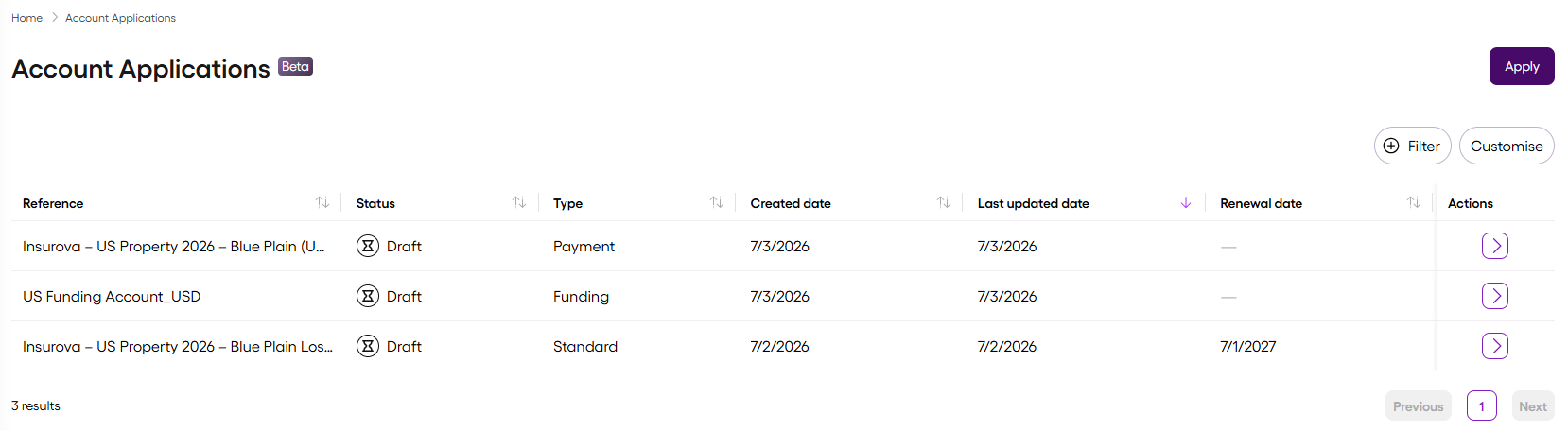
💡Use Filter and Customise above the Account Applications list to sort the list and customise the column appearance and order.
Before applying for an account, make sure you have the following information to hand:
- Company and primary contact details
- Claims administrator address and primary contact details (if applicable)
- Broker address and primary contact details (if applicable)
- Insurance marketplace details, including:
- UMR and Section ID – only for Lloyd's-related accounts
- CAT code
- Underwriting reference
- One or more notification recipient email addresses (if required)
For information about the different account types that Vitesse offers, see Account types.
- Go to Administration > Account Applications.
- Select Apply.
- Select the account type, one of:
Standard
Funding
Payment
- Follow the form to complete the application.
The sections and fields you must complete depend on the account type you select. For information about each field, see below.
- Review the application.
- Select Submit.
Vitesse reviews the request. You can monitor its progress in the Account Applications list.
You can save an application as a draft and return to it later.
| Field | Description |
|---|
| Company name | The legal name of the organisation requesting the account. |
| Primary contact | The main business contact for the account application, including their details. |
| Secondary contact | An optional additional business contact for the account application. |
| Field | Description |
|---|
| Claims administrator vs self-managed option | Indicates whether claims are administered through a third party, or directly by your organisation. |
| Claims administrator | The organisation responsible for administering claims. |
| Registered address | The claims administrator's registered business address. |
| Country | The country where the claims administrator is registered. |
| Primary contact | The main business contact for the claims administrator, including their details. |
| Secondary contact | An optional additional business contact for the claims administrator. |
| Field | Description |
|---|
| Broker vs no broker option | Indicates whether there is a broker associated with the account. |
| Broker company name | The name of the broker associated with the insurance placement. |
| Broker ID | Identifies the broker. |
| Primary contact | The main business contact for the broker, including their details. |
| View-only access check box | Confirms that the applicant has authorised the broker to view payment details. |
| Onboarding confirmation check box | Confirms that the broker is aware that this contract uses Vitesse. |
| Field | Description |
|---|
| Currency | The currency in which the account holds funds. |
| Initial loss fund amount | The amount allocated to the account when it is created. |
| Payment limit | The maximum amount permitted for a single payment. |
| Field | Description |
|---|
| Market | The insurance market associated with the account. |
| Unique Market Reference (UMR) | Required for Lloyd's account applications. The unique reference that identifies a London Market insurance placement. |
| Section ID | Required for Lloyd's account applications. Identifies the section of the insurance placement associated with the account. |
| Class of business | The type of insurance business covered by the account. |
| Sub-class / Peril | The specific class of business or insured peril covered by the account. |
| CAT code | The catastrophe classification associated with the account, used for reporting and risk management. |
| Underwriting reference | The insurer's internal reference for the insurance placement. |
| Risk / Programme ID | Identifies the associated risk or insurance programme. |
| Natural catastrophe flag | Indicates whether the account relates to natural catastrophe business. |
| Field | Description |
|---|
| Inception date | The date on which the policy becomes effective. |
| Renewal date | The date on which the policy is due for renewal. |
| Year of account | The underwriting year associated with the policy. Automatically populated from the inception date. |
| Field | Description |
|---|
| Payment on behalf of | For US eChecks only. The name that appears on the eCheck to identify the organisation issuing the payment. |
| Field | Description |
|---|
| Suggested account name | The account name generated from the application details. |
| Alternative account name | An alternative name used instead of the suggested account name. |
| Loss fund identifier | The unique identifier assigned to the loss fund associated with the account. |
| Field | Description |
|---|
| Receive balance notifications | Indicates whether Vitesse sends notifications when the account balance falls below the minimum balance threshold. |
| Minimum balance threshold | The minimum account balance permitted before Vitesse sends a balance notification. |
| Recipient emails | One or more comma-separated email addresses that receive balance notifications. |
