
Make a Payment Request
Pre-requisites: Stored Recipients
With Vendor Pay, you issue Payment Requests to Stored Recipients. To create Stored Recipients, refer to Create a Stored Recipient or contact Vitesse for bulk import and mass capture options.
Your application must access the Vitesse-generated StoredRecipientId or your own ExternalStoredRecipientId associated with the vendor at the time of creation.
Detailed Payment Request flow
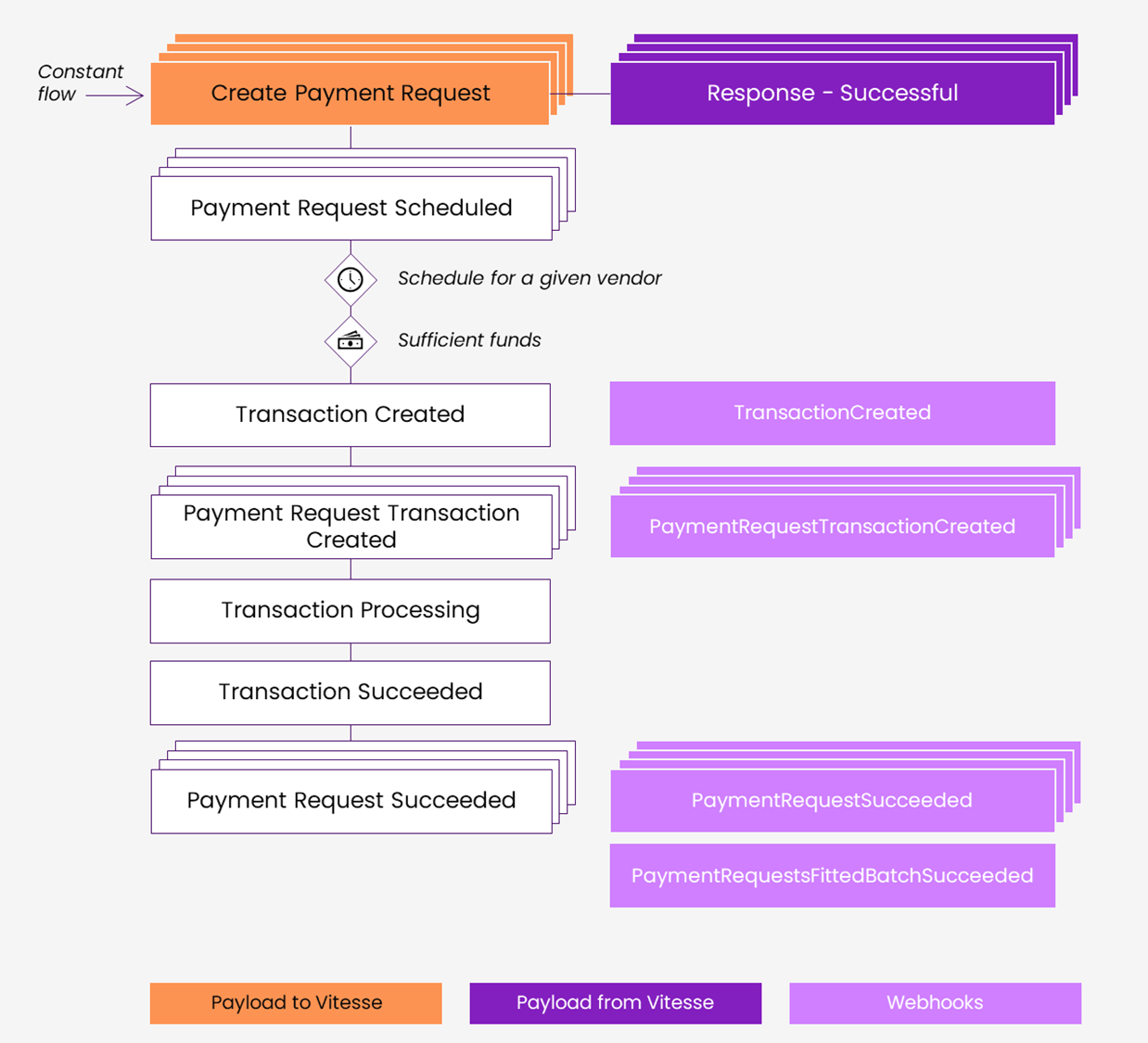
| Stages | Application | Vitesse | Webhooks Events | Comments |
|---|---|---|---|---|
| Create Payment Request | X | Repeat until schedule triggered for a given vendor. | ||
| Response - Successful | X | Repeat until schedule triggered for a given vendor. | ||
| Payment Request Scheduled | X | Repeat until schedule triggered for a given vendor. | ||
| Transaction created | X | TransactionCreated | Batch transaction (if funds are sufficient) | |
| Payment Request Transaction Created | X | PaymentRequestTransactionCreated | For each Payment Request in the batch | |
| Transaction processing | X | |||
| Transaction succeeded | X | |||
| Payment Request Scheduled | X | PaymentRequestSucceeded | For each Payment Request in the batch | |
| Payment Request Fitted Batch Succeeded | X | PaymentRequestsFittedBatchSucceeded |
You can find the full list of webhooks events and examples on Webhook subscription event reference.
Create a sample Payment Request
-
In Postman, set the request type to POST.
-
As URL, enter https://api.staging.vitesse.io/v1/payment-initiation/paymentRequests
This is the endpoint for validating transaction requests. After the parameters are validated, we'll replace it with the endpoint for making payment requests. -
Select Headers, and provide the following header parameters:
Key Value Notes AuthorizationBearer[TOKEN]Replace [TOKEN] with your token. Content-Typeapplication/json -
Select Body.
-
In curly brackets, provide the body parameters. Parameters in bold are mandatory.
Parameter Type Description SendAccountIdNumber The ID of the Vitesse account from which funds will be drawn. It has to be allowed in the programme. SendValueDouble The amount you want to send in the currency defined in SendCurrency.SendCurrencyString Use an ISO 4217 currency code, for example, GBP. See the full list of codes. ReceiveValueDouble The amount you want to send in the currency defined in ReceiveCurrency.ReceiveCurrencyString The currency in which you want to make the payment. PaymentMethodString BankAccountStoredRecipientObject StoredRecipient.StoredRecipientIdorStoredRecipient.ExternalStoredRecipientIdString One of the two, not both SchedulerObject Scheduler.DefaultBoolean TruePaymentDescriptionString The description that the payee will see... RecipientReferenceString The description that the payee will see on their bank/card statement or check memo. ExternalReference1String Internal field for reconciliation ExternalReference2String Internal field for reconciliation ExternalReference3String Internal field for reconciliation
Request example
{
  "SendAccountId": 1234,
  "SendCurrency": "GBP",
  "ReceiveValue": 100,
  "ReceiveCurrency": "GBP",
  "PaymentMethod": "BankAccount",
  "StoredRecipient": {
    "StoredRecipientId": "00000000-0000-0000-0000-000000000001"
  },
  "Scheduler": {
        "Default": true
  },
  "PaymentDescription": "payment description",
  "RecipientReference": "recipient reference",
  "ExternalReference1": "external reference 1",
  "ExternalReference2": "external reference 2",
  "ExternalReference3": "external reference 3"
}
Response example
You will get payment request with details and identifier PaymentRequestId when created successfully.
{
  "PaymentRequestId": "b9fbfa0e-881f-45f2-bbd3-11d9f5f741c0",
  "SendAccountId": 1234,
  "PaymentMethod": "BankAccount",
  "SendCurrency": "GBP",
  "ReceiveValue": 100.00,
  "ReceiveCurrency": "GBP",
  "StoredRecipient": {
    "StoredRecipientId": "00000000-0000-0000-0000-000000000001"
  },
  "RecipientReference": "recipient reference",
  "PaymentDescription": "payment description",
  "ExternalReference1": "external reference 1",
  "ExternalReference2": "external reference 2",
  "ExternalReference3": "external reference 3",
  "Extra": {
    // Set of extra fields here
  },
  "Status": "Initiated"
}
Monitor the 'Payment Request' status
You can monitor the Payment Request states via two methods:
- Polling the Retrieve payment request endpoint
- Using Webhooks to receive real-time updates
Webhook events are triggered throughout the payment request and payee selection process to keep your systems updated in real time. These events cover changes to the payment request, payee journey, and transaction status.
This allows your systems to track progress, respond to errors, and maintain end-to-end visibility. Subscribing to these events ensures a transparent and controlled payment process, supporting operational efficiency and reliability.
Possible states are listed on Payment lifecycle.
Updated 3 months ago