
Make a Payment Request
Pre-requisites: Programme
Before initiating a Payment Request, you must have one or more Programmes that define key parameters such as branding, supported payout methods, support contact details, and legal content. Each Programme also determines whether your application or the Vitesse system will send emails to the payee.
Contact the Vitesse Solutions team to create your programmes.
We recommend implementing a dynamic connection to Programmes, as their number and parameters may change over time. Your application should begin by retrieving the necessary details for the Programme you intend to use when creating a Payment Request. See Get programme details.
Payment Request flow
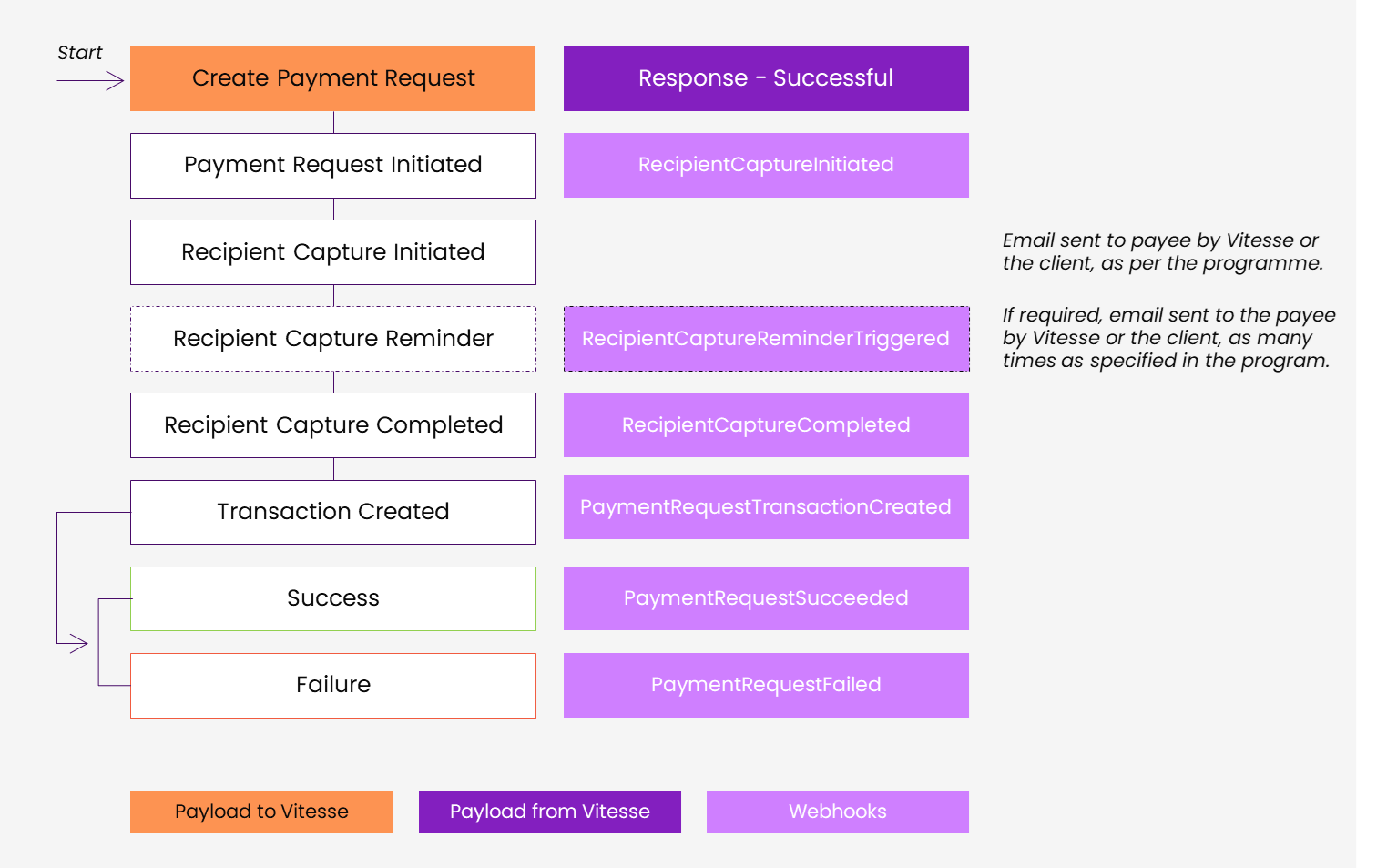
| Stages | Application | Vitesse | Webhooks Events | Comments |
|---|---|---|---|---|
| Create Payment Request | X | |||
| Response - Successful | X | |||
| Payment Requests Initiated | X | |||
| Recipient Capture Initiated | X | RecipientCaptureInitiated | ||
| Email notification to Recipient | [X] | [X] | Client application or Vitesse platform, as defined in the programme | |
| Reminder Email notification to Recipient | [X] | [X] | RecipientCaptureReminderTriggered (if emails managed by Vitesse) | As many time as defined in the programme |
| Recipient Capture Completed | X | RecipientCaptureCompleted | ||
| Transaction created | X | PaymentRequestTransactionCreated | If funds available in selected account | |
| Transaction processing | X | |||
| Transaction succeeded | X | PaymentRequestSucceeded | ||
| Transaction failed | X | PaymentRequestFailed | ||
| Inform payee | X | Confirmation or next steps for failed transactions |
You can find the full list of webhooks events and examples on Webhooks Event Reference.
Create a sample Payment Request
-
In Postman, set the request type to POST.
-
As URL, enter https://api.staging.vitesse.io/v1/payment-initiation/paymentRequests
This is the endpoint for validating transaction requests. After the parameters are validated, we'll replace it with the endpoint for making payment requests. -
Select Headers, and provide the following header parameters:
Key Value Notes AuthorizationBearer[TOKEN]Replace [TOKEN] with your token. Content-Typeapplication/json
-
Select Body.
-
In curly brackets, provide the body parameters. Parameters with an
*(asterisk) are mandatory.Parameter Type Description SendAccountId*Number The ID of the Vitesse account from which funds will be drawn. It has to be allowed in the programme. SendValueDouble The amount you want to send in the currency defined in SendCurrency.SendCurrencyString Use an ISO 4217 currency code, for example, GBP. See the full list of codes. ReceiveValueDouble The amount you want to send in the currency defined in ReceiveCurrency.ReceiveCurrencyString The currency in which you want to make the payment. RecipientObject This object contains the data of the recipient. Recipient.Type*String PersonorBusinessRecipient.Name*String Recipient.PhoneNumberString Recipient.Email*String Recipient.CountryString Use an ISO 3166-1 alpha-2 country code, for example, US. See the full list of codes Recipient.CaptureObject This object contains the parameters of the capture. Capture.ProgrammeId*String cf. Get programme details Capture.TrustMethodsObject TrustMethods.TrustMethodId*String policy-numberor ...TrustMethods.Value*String The value that the payee needs to enter. Capture.VerificationMethodsObject VerificationMethods.VerificationMethodId*String code-Smsor ...VerificationMethods.VerificationMethodType*String CodeVerificationMethods.CodeObject VerificationMethods.Code.ChannelsString SmsCapture.AllowedPaymentMethods*String BankAccount,Echeck,PostalChequePaymentDescription*String The description that the payee will see... RecipientReference*String The description that the payee will see on their bank/card statement or check memo. ExternalReference1String Internal field for reconciliation ExternalReference2String Internal field for reconciliation ExternalReference3String Internal field for reconciliation
Request example
{
  "SendAccountId": 1234,
  "SendCurrency": "USD",
  "ReceiveValue": 10,
  "ReceiveCurrency": "USD",
  "Recipient": {
      "Type": "Person",
      "Name": "Example Recipient",
      "PhoneNumber": "+1408XXXXXXX",
      "Email": "[email protected]",
      "Country": "US",
      "Capture": {
          "ProgrammeId": "ce0872ee-75a5-4a38-8f65-b5074eac7401",
          "TrustMethods": [
              {
                  "TrustMethodId": "policy-number",
                  "Value": "ABC1234"
              }
          ],
          "VerificationMethods": [
              {
                  "VerificationMethodId": "code-Sms",
                  "VerificationMethodType": "Code",
                  "Code": {
                      "Channels": ["Sms"]
                  }
              }
          ],
          "AllowedPaymentMethods": ["BankAccount", "Echeck", "PostalCheque"]
      }
  },
  "PaymentDescription": "payment description",
  "RecipientReference": "recipient reference",
  "ExternalReference1": "external reference 1",
  "ExternalReference2": "external reference 2",
  "ExternalReference3": "external reference 3",
  "Extra": {
     // Set of extra fields here
  },
  "Originator": {
    "Name": "Originator Name",
    "Address": "Originator Address",
    "Identifier": " Originator Identifier"
  }
}
Response example
You will get payment request with details and identifier PaymentRequestId when created succesfully.
{
    "Recipient": {
        "Capture": {
            "VerificationMethods": [
                {
                    "VerificationMethodId": "code-Sms",
                    "VerificationMethodType": "Code",
                    "Code": {
                        "Channels": [
                            "Sms"
                        ]
                    }
                }
            ],
            "ProgrammeId": "ce0872ee-75a5-4a38-8f65-b5074eac7401",
            "TrustMethods": [
                {
                    "TrustMethodId": "policy-number",
                    "Value": "ABC1234"
                }
            ],
            "AllowedPaymentMethods": [
                "BankAccount",
                "ECheck",
                "PostalCheque"
            ]
        },
        "Type": "Person",
        "Name": "Example Recipient",
        "PhoneNumber": "+1408XXXXXXX",
        "Email": "[email protected]",
        "Country": "US"
    },
    "PaymentRequestId": "2b179cb7-2534-4782-b76c-78b978d04147",
    "Status": "Initiated",
    "CreatedAt": "2025-09-23T06:25:00.5899676Z",
    "SendAccountId": 1234,
    "ReceiveValue": 10,
    "SendCurrency": "USD",
    "ReceiveCurrency": "USD",
    "PaymentDescription": "payment description",
    "RecipientReference": "recipient reference"
}
Monitor the 'Payment Request' status
You can monitor the Payment Request states via two methods:
- Polling the Retrieve payment request endpoint
- Using Webhooks to receive real-time updates
Webhook events are triggered throughout the payment request and payee selection process to keep your systems updated in real time. These events cover changes to the payment request, payee journey, and transaction status.
This allows your systems to track progress, respond to errors, and maintain end-to-end visibility. Subscribing to these events ensures a transparent and controlled payment process, supporting operational efficiency and reliability.
Possible states are listed on Payee Choice States.
Collecting Payee payment details
After a payment request is initiated, the payee receives an email with a secure link to submit their payment details. Depending on the programme setup, this email is sent either by your application or by Vitesse, with an expiry period and reminders.
When the payee has provided the payment details, Vitesse system sends the payment (i.e. creates the Transaction).
Success
If you've subscribed to webhooks, your system will receive the following payload after the transaction has been successful.
{
  "EventId": "00000000-0000-0000-0000-000000000001",
  "EventType": "PaymentRequestSucceeded",
  "TimestampUTC": "2025-30-07T00:00:123456Z",
  "Data": {
    "PaymentRequestId": "2b179cb7-2534-4782-b76c-78b978d04147",
    "ExternalReference1": "external reference 1",
    "ExternalReference2": "external reference 2",
    "ExternalReference3": "external reference 3"
    "Extra": {
      // some key-values here
    },
    "TransactionRequestId": "cbf775cb-7d3c-4bfc-88db-da97ef129f96",
    "RoutingDetails": {
      "SendCurrency": "USD",
      "SendValue": 10,
      "ReceiveCurrency": "USD",
      "ReceiveValue": 10,
      "Rate": 1
    }
  }
}
Your application can send a confirmation to the payee (optional).
Failure
If you've subscribed to webhooks, your system will receive the following payload after the transaction has failed.
{
  "EventId": "00000000-0000-0000-0000-000000000001",
  "EventType": "PaymentRequestFailed",
  "TimestampUTC": "2025-30-07T00:00:123456Z",
  "Data": {
    "PaymentRequestId": "2b179cb7-2534-4782-b76c-78b978d04147",
    "FailedAt": "2024-02-20T10:00:11.753463Z",
    "FailureReason": "TransactionFailed",
    "TransactionFailureType": "AmountAboveAccountLimit",
    "TransactionFailureReason": "The transaction amount of 205.00 GBP is above the account limit of 100.00 USD.",
  }
}
Your application must explain the next steps to the payee.
Updated 7 months ago