
Voiding Cheques
This page explains how to void an uncashed cheque.
If an uncashed cheque is no longer needed or has expired, cheques voids can be requested either through the API or via the MAS portal. For more information on how to use the API for cheque voids, refer to Void a cheque.
Voids are only possible when the Transaction Status is
Succeededand the Cheque Status isUncashed.Once submitted and approved, void requests are not executed immediately. Instead, they go through a voiding process involving our cheque processing partners, during which the status is set to
Void Pending. Once the void is complete, the void request status changes toCompleted.
User roles & approval
To create a void request, users must be assigned the Create Void Requests role.
Additionally, an approval workflow can be set up, requiring a user with the Void Request Approver role to approve the request. Contact Customer Service to enable this workflow.
Requesting a cheque void
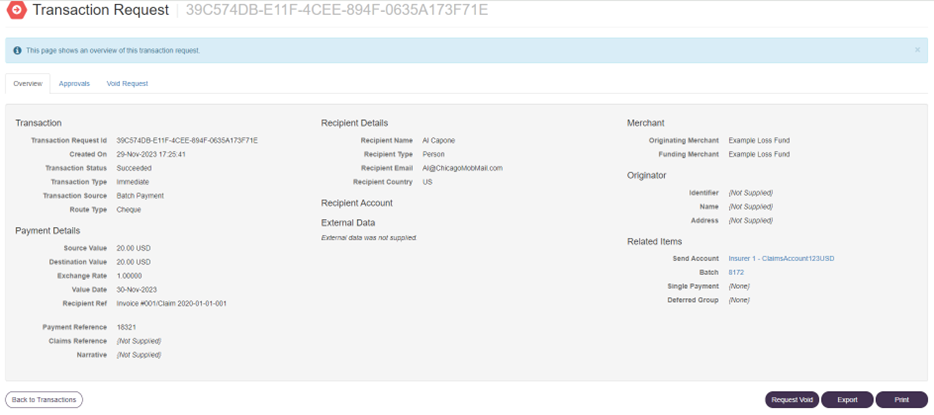
Within the MAS portal, users with the appropriate user role can select individual cheque transactions and request a void.
When the above conditions are met, the option to 'Request Void' will be available on the transaction request detail screen. When selected, it will activate the void process or trigger the void request approval flow (based on your account settings).
Approving a cheque void request
If no approval is required, the cheque void request will immediately action the void process.
If approval of the cheque void request is required, a user with the appropriate role will see the void request approval on their 'Outstanding Tasks' in MAS and can approve or reject it. Upon approval, the system will action the void process.
Viewing the status of a cheque void request
An overview of all cheque voids and their respective status can be found by selecting 'Cheque Voids' from the 'Money Out' dropdown on MAS. The grid view can be filtered by status, which allows an easy overview of all cheques.
Cheque voids may have the following statuses:
| Status | Description |
|---|---|
| Approval Requested | A cheque void request has been created and is awaiting approval on MAS |
| Approved | A cheque void request has been approved on MAS by the customer |
| Rejected | A cheque void request has been rejected on MAS by the customer |
| Void Pending | The cheque void request has been approved and is pending action by Vitesse |
| Completed | The cheque has been successfully voided by Vitesse |
| Rejected by Vitesse | The cheque void request has been rejected by Vitesse |
| Superseded by Vitesse | Vitesse have created a manual void request for the same transaction |
| Cancelled | The requester cancelled the void request |
As an approver, going into the cheque voids grid and selecting Approval Requested as filter allows for simple visibility of all cheque void requests that still require approval.
Cancelling / rejecting a cheque void request
If the approval workflow is enabled on your account, cancellations can only be initiated by the original void requesting user while the request is in the Approval Requested status. Of course, the approving user can also reject the void request.
Updated 4 months ago