
Common errors
The most common errors we see when using the immediate transaction API are as follows. This isn't an exhaustive list, but if you are integrating with us it's a good place to start when you receive an error back from the API.
In each of these examples we'll assume you have made a POST request to /api/transactionRequests.
401 Unauthorized
Every time we've seen this it's been one of the following four cases...
- No token was specified when calling the API.
- The token is for the wrong environment.
- The token has expired.
- The token does not contain the correct roles.
Assuming you have specified a token - is it for the right environment? You can't use Staging tokens on Live, and you can't use Live tokens on Staging. To find out what environment it's for, and whether it's expired, and also the roles contained in the token, please go to https://jwt.io, and then paste your token into the page. This will decode the token and show you the environment, roles, and also expiration date.
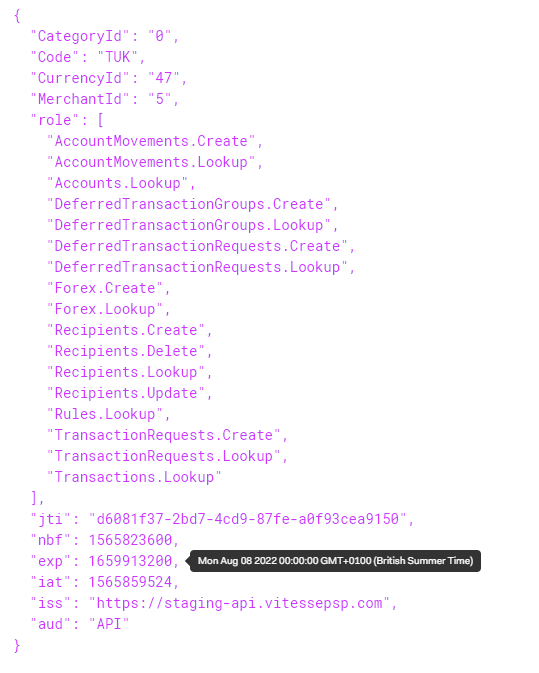
The expiration date of the token can be seen by hovering over the value of the exp element. If you're interested, you can also check out when the token was issued (iat) and also when it was first valid (nbf).
The set of roles is provided, and you can check with our API docs which role is needed for each endpoint, and the iss element specifies which environment the token is designed for.
For information about environment, see Environment: Transaction API.
Please check and double check all of this before raising a support incident, as every support request we've had where a 401 Unauthorized response has been returned from the API is one of the above issues.
400 - Bad request
This error is common when beginning an integration as you've omitted one or more fields from the API request. The response however will provide details of the field(s) that are in error. As an example, the following response is from an API call where I omitted the RecipientReference field...
{
  "Code": "ArgumentInvalid",
  "Message": "One or more arguments passed to the API call have an invalid value.",
  "MoreInfo": "https://docs.vitessepsp.com/reference#section-argumentinvalid",
  "ModelState": {
    "request.Recipient.RecipientReference": {
      "Errors": [
        {
          "ErrorMessage": "This field is required."
        }
      ]
    }
  }
}
The ModelState element contains a collection of one or more fields, and then the errors collection contains one or more error messages per field. The name of the missing field is request.Recipient.RecipientReference. Here request is our term for the entire request object that's being sent to the API. It's saying that the RecipientReference field of the Recipient object is missing.
There are many reasons why you might get a 400 error - missing mandatory fields, fields too long or too short, invalid data (such as an unverifiable IBAN) to name the most common. If you do receive a 400 error though, please check the error message(s) returned from the API as they will instruct you as to exactly what's wrong with the call.
Another comment example - especially when starting testing, is running out of money...
{
  "Code": "InsufficientBalance",
  "Message": "There is insufficient money in your 'EUR' account (338)  for a transaction of '100.00'. The current balance stands at '0.00'. Please deposit some funds into this account.",
  "MoreInfo": "https://docs.vitessepsp.com/reference#section-insufficientbalance"
}
All this means is that your virtual account in our system has no money in it (or insufficient money), and therefore the transaction cannot be processed.
Updated 4 months ago