
Managing payment limits
Overview
A payment limit defines the maximum amount that can be processed from a payment or standard account in a single transaction. This guide explains how to request, approve, and manage payment limit changes, temporary and permanent, on MAS.
User Roles
- Create Payment Limit Requests: Can submit, view, and revoke requests
- Payment Limit Request Approver: Can approve, reject, view, and revoke requests
How to create a Payment limit change request
You need the Create Payment Limit Requests role.
- Go to: Administration > Payment Limits
- Find the account to update
- Click: Action > Manage
- Fill in required fields
- New payment limit (between the current limit and 500,000,000 for temporary requests and between 0.01 and 500,000,000 for permanent requests)
- Duration (1-72 hours or permanent)
- Request reason
- Uploading relevant documents is optional
- Click: Request
The Payment limit request status changes to 'Submitted for Approval', and an email is sent to the approver.
Note: You can manage documents with Action > Documents while the status is Submitted for Approval.
How to review a Payment limit change request
You need the Payment Limit Request Approver role.
-
Click the link in the notification email or log in to MAS and go to: Administration > Payment Limits
-
Find the account to approve
-
Click: Action > Manage
-
[Option] Adjust Duration (1-72 hours or permanent) and provide a reason if duration is changed
-
Select one of the following:
- Approve: Request is accepted
- Approve via External Approver: Provide details of the approver
- Reject: A reason must be provided
The Payment limit request status changes to 'Approved' or 'Rejected', and a confirmation email is sent.
Upon approval, the new payment limit takes effect after a 3-hour delay. This delay acts as a security safeguard, allowing time to review and, if necessary, revoke the approval.
After the 3-hour delay, the request status becomes 'Active' for temporary requests and 'Implemented' for permanent requests.
In urgent cases, to override the 3-hour delay, the Funding Account Admin or a Funding Account User with the Approver role must email[email protected] with the following details:
• Account name and Reporting name
• Requested limit and Duration
• Reason for the override
- If the request is sent by the same user who approved it, Vitesse will visually verify the sender’s email address matches the one stored in the system.
- If the request is sent by a different user than the original approver, Vitesse will confirm the request verbally with the original approver before proceeding.
How to revoke a Payment limit change
Requests with the “Submitted for Approval” status are automatically revoked if not approved within 5 days (120 hours), excluding weekends.
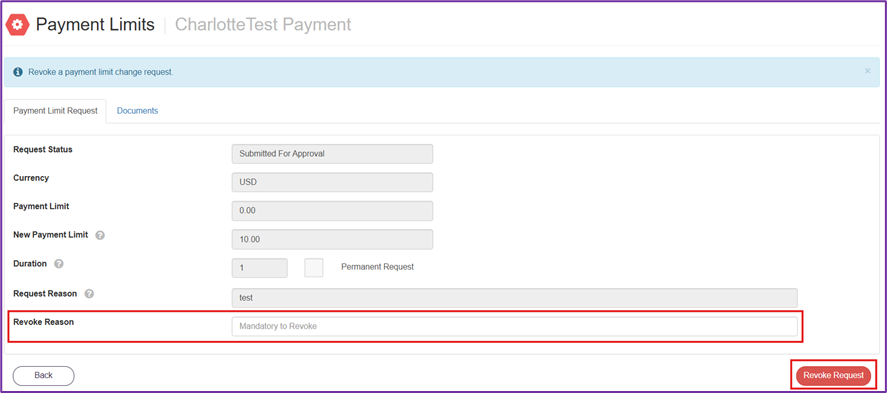
Requests with the 'Submitted for Approval', 'Approved', or 'Active' status can be manually revoked by the requester. Requests with the 'Approved', or 'Active' status can be manually revoked by the approver or Vitesse.
- Go to: Administration > Payment Limits
- Click: Action > Manage
- Enter a reason
- Click: Revoke Request
How to report on Payment limits and changes
- View the documents by clicking Action > Documents
- View the history by clicking Action > History (includes Events and Documents)
- Export all Payment Limits by clicking Export to Excel at the top of the page
Email Notifications
- New request submitted
- Reminder - Approval pending 72 Hours
- Request automatically 'Revoked'
- Request 'Accepted' or 'Rejected'
- Request 'Revoked' when status is 'Submitted for Approval' or 'Approved' or 'Active'
- Request transitions from 'Approved' to 'Active' or 'Implemented'
- Request 'Expired'
Frequently asked questions
- Can I approve my own request? No
- Are these features available through the API? No
- Can other users revoke a request? No, only the original requester
Updated 4 months ago