
Deferred transactions batch
This page is archived as a legacy product reference for customers
This example follows on from the previous Immediate Transactions sample as it create a deferred transaction.
The same account data and recipient are used as the prior example, and the fields in bold show the difference between this and the immediate transaction example. To understand the difference between immediate and deferred transactions, please see the overview.
| Field | Value |
| SendCurrency | GBP |
| SendValue | 100 |
| RecipientName | Jules Verne |
| RecipientCountry | FR |
| RecipientCurrency | EUR |
| RecipientReference | Book Payment |
| AccountIban | FR1420041010050500013M02606 |
| AccountSwift | CCBPFRPPINS |
| RateGroupDurationInDays | 1 |
| FundingType | Deferred |
The corresponding CSV data is shown below, if you hover over the text you can copy the example to the clipboard.
SendCurrency,SendValue,RecipientName,RecipientCountry,RecipientCurrency,RecipientReference,AccountIban,AccountSwift,RateGroupDurationInDays,FundingType
GBP,100,Jules Verne,FR,EUR,Book Payment,FR1420041010050500013M02606,CCBPFRPPINS,1,Deferred
NoteAs in the immediate TX example, this shows a terse set of fields - it's common to include additional data in a request, this has the absolute minimum fields necessary to make a payment.
When creating deferred transactions, these need to be associated with a set of "locked" FX rates. You can either ask us to create a set of locked rates by using the RateGroupDurationInDays field, or you can instead use the RateGroupId column and supply the ID of a valid rate group. You might want to do this if you lock in rates on a daily basis, and want all batches from that day to use the same ID.
Funding Type
The FundingType field can be one of three values - Immediate (the default, if it's not supplied then this will be used), Deferred or FundingMerchantLookup.
If you use the FundingMerchantLookup value then the funding type is based on a setting within the system that is administered by our operations staff. What happens here is that when a row has this value, we first lookup the account associated with the particular batch line. From that, we then lookup the merchant associated with that account (we have the option of linking merchants together which is typically used by our Insurance clients). Then once we have the funding merchant, we lookup a flag to see if the funding mode should be Immediate or Deferred.
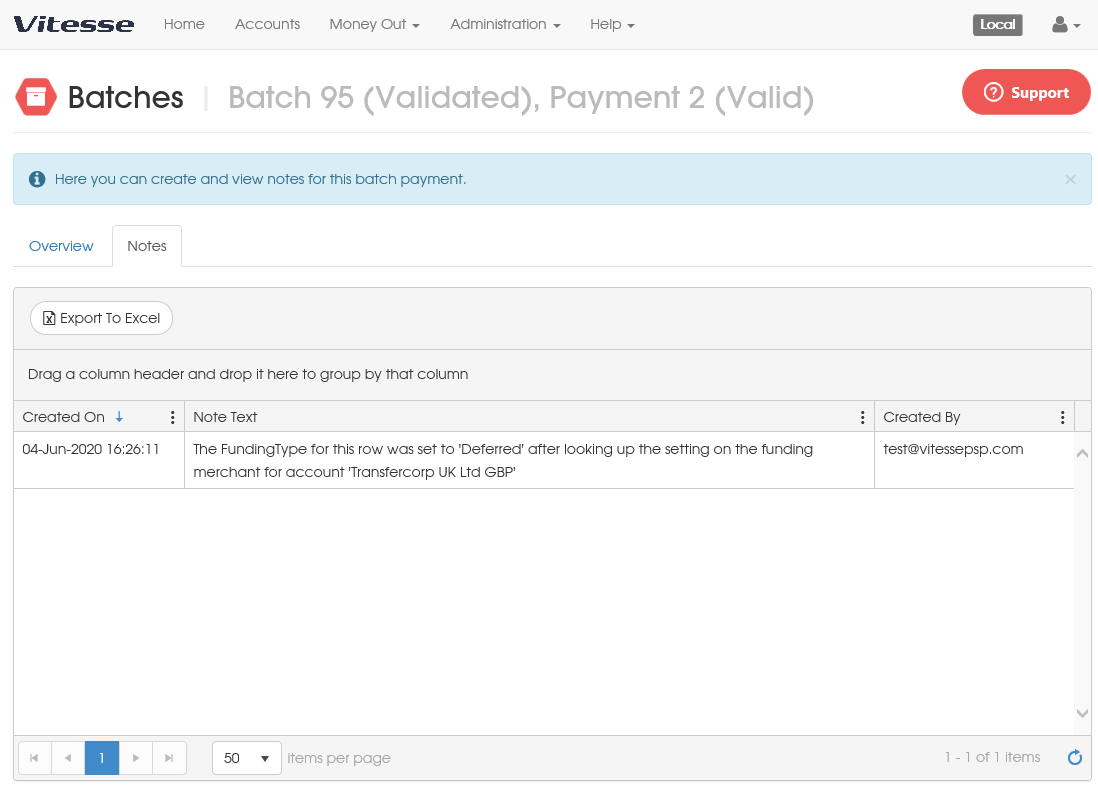
In the case of a lookup, we also automatically add a note to the batch line that states what mode was chosen. If you view notes on the individual row you would see the following...
Locking in FX Rates
When using deferred transactions, it's necessary to use "locked in" FX rates, and when using a batch you can do this in one of two ways. You can either supply a value in the RateGroupId column, which corresponds to a pre-created rate group (see Forex for further details), or you can supply a value for RateGroupDurationInDays which will then automatically create a rate group for this batch, and assign each deferred TX in the batch to that rate group.
With deferred transactions you have to supply one or the other of RateGroupId or RateGroupDurationInDays, omitting both (or, conversely, providing both) will result in an error when the batch line is validated after upload.
An example using RateGroupDurationInDays is shown above, the following uses RateGroupId instead.
SendCurrency,SendValue,RecipientName,RecipientCountry,RecipientCurrency,RecipientReference,AccountIban,AccountSwift,RateGroupId,FundingType
GBP,100,Jules Verne,FR,EUR,Book Payment,FR1420041010050500013M02606,CCBPFRPPINS,12345,Deferred
Updated 4 months ago