
Bulk fund accounts (remittance file)
Fund multiple Vitesse accounts with a single bank transfer to a Vitesse omnibus account, then tell Vitesse how to allocate the funds using a remittance file.
We recommend using Vitesse online to submit funding instructions. For more information, see Bulk fund accounts (Vitesse online). Bulk funding using a remittance file remains available for customers who already use this workflow.
Bulk funding is available for the UK Hub only.
You can fund Funding accounts and Standard accounts, not Payment accounts, as they draw funds from funding accounts. For more information, see Account types.
Get your standard settlement instructions (SSI)
Contact Support for a list of omnibus account settlement details.
Each currency has its own account details.
Send your bank transfer
Using the SSI provided by Support, send a single transfer for the total amount you want to allocate.
When sending funds via SWIFT, select OUR as the fee type. This ensures Vitesse receives the full funding amount without deductions.
Banks may truncate payment references. We recommend you limit the payment reference to 18 characters.
Make a note of your exact payment reference. Vitesse uses the payment reference to identify the bank transfer.
An incorrect payment reference may delay funding or require manual investigation.
Provide funding instructions
Use our remittance file template to tell Vitesse how to allocate the bank transfer across your accounts.
-
Download the funding template.
-
Enter the Payment Reference and Date used for the bank transfer at the top of the template.
The payment reference, currency, and total amount in your remittance file must match the bank transfer exactly.
-
For each account you want to fund, complete a line with:
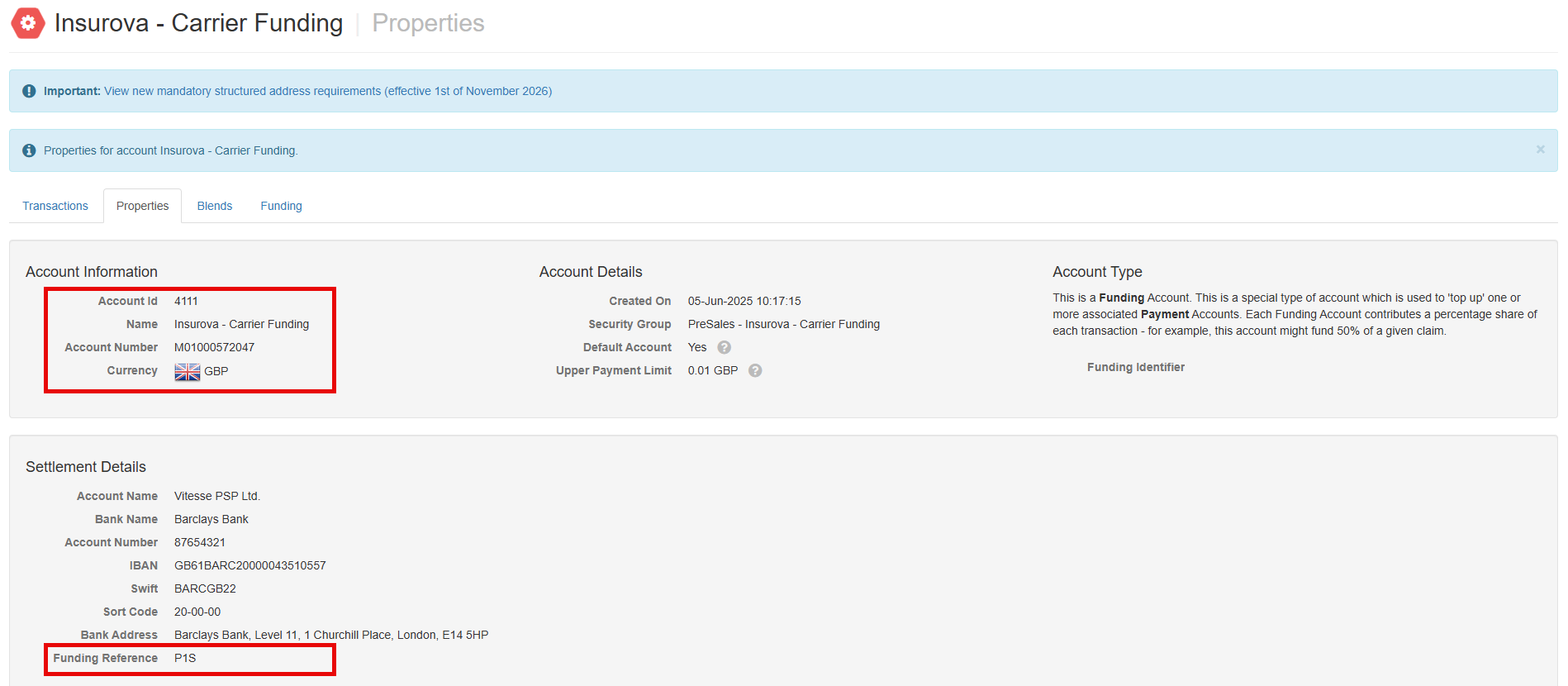
Column Description Amount The amount you want to allocate to the account. Currency The funding currency. Account ID The unique integer identifier for the account. Account Name The name of the account you want to fund. Account Number The unique alphanumeric identifier for the account. UI Code The three-digit Funding Reference for the account. Narrative The payment reference for the funding allocation. Comments Any additional information. Using MAS, you can locate account information on the Account Properties tab. See below for more information.
-
Confirm that the Total of your allocation lines equals the total payment amount.
-
Contact Support with the completed remittance file attached. Use the following subject line:
Bulk payment <Payment reference> <Currency> <Bank transfer total> <Bank transfer date>
For example: Bulk payment BINDER XYZ123 GBP 5,200 24/08/2026
Locate account information
-
Log in to MAS.
-
Select Accounts.
-
.Select the relevant account where you want to distribute funds.
-
On the Properties tab, locate Account Information and Settlement Details.
What happens next?
Vitesse uses the remittance file to allocate the incoming bank transfer across the accounts according to the instructions you provided.
Missing funds
If you cannot see expected funds after the applicable processing time, contact Support.
Updated about 2 months ago