
Authentication: Transaction API
Your application must use an API token to integrate with the Vitesse API. For production-grade integrations, you must use Vitesse Identity Clients to authenticate via the OAuth 2.0 client credentials flow.
This method enables your application to request short-lived tokens dynamically, using a registered Client ID and Secret. Tokens are valid for 10 to 60 minutes and are never stored. Your system requests a fresh token as needed. This improves security, simplifies token rotation, and supports full automation.
Prerequisites
Before you can request a token:
- Create one or more Identity Clients in MAS to control your API access.
For information about creating and managing Identity Clients, see Managing Identity Clients.
You may want to consider different Identity Clients for each environment you use, or if you have multiple apps or microservices calling the same API, or if you want to limit access.
- Contact Support with the following details:
- The Client ID for each Identity Client you have set up.
- List your organisation's public IP address(es), for Vitesse to include on the allowlist. We will get in touch to establish how you are using the API and what roles you will require.
- You must include Vitesse IP addresses on your allowlist.
For more information, see Environment: Transaction API.
OAuth Client Credentials flow
This flow is designed for machine-to-machine communication.
How it works
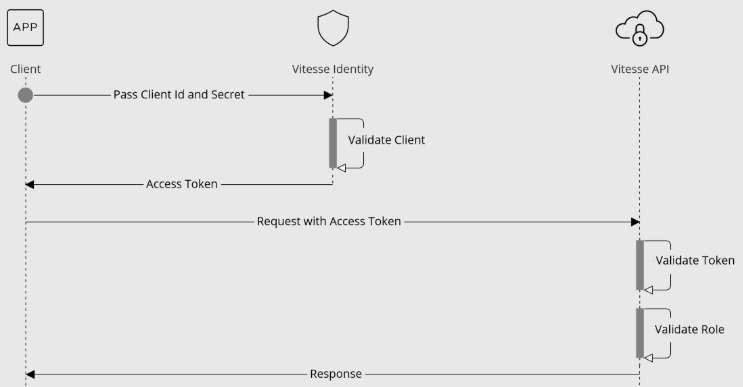
- Your application sends the Identity Client's ID and Secret to the Vitesse Identity endpoint.
- If the client is enabled and the credentials are valid, Vitesse Identity returns a short-lived bearer token.
This token includes the roles assigned to the Identity Client.
- Your application includes this token in the
Authorizationheader for all API requests.
The API validates each token's signature, issuer, expiry, and assigned roles before granting access.
Identity endpoints
Use the appropriate endpoint for your environment:
- Staging: https://staging-identity.vitessepsp.com/connect/token
- UK Production: https://identity.vitessepsp.com/connect/token
- US Production: https://identity.us.vitesse.io/connect/token
Requesting an API token
To request a token using your Identity Client, send a POST request to the Vitesse Identity endpoint with the following parameters in the request body (use application/x-www-form-urlencoded content type):
client_id– The relevant client IDclient_secret– The client secret for authenticating the clientgrant_type– Useclient_credentialsfor machine-to-machine authenticationscope– UseAPIfor permission to create and manage transactions
If
scopeis omitted, it defaults toAPI. If you include ascopethat your Identity Client is not permitted to access, the request will fail. If you omit a required scope, the token will not include the necessary permissions and API calls to those endpoints will fail.
If you require access to both the Vitesse API and Foundations API, generate separate tokens with the appropriate
scopefor each.
Request
POST https://staging-identity.vitessepsp.com/connect/token
Content-Type: application/x-www-form-urlencoded

    client_id=your-client-id&
    client_secret=your-client-secret&
    grant_type=client_credentials&
    scope=API
Response
{
  "access_token": "<token>",
  "token_type": "Bearer",
  "expires_in": 3600,
  "scope": "API"
}
Using the API token
- Include the token in the
Authorizationheader of all API requests:
Authorization: Bearer <your-access-token>
Example request header
POST /v1/paymentRequests
Authorization: Bearer eyJhbGciOi...
Debugging the API token
To inspect the token contents (such as expiration time, roles, environment), paste the access_token into https://jwt.io.
Updated about 2 months ago