
Single Payment Funding
This is a legacy topic. For current information, see About funding.
Single payment funding is used to fund an individual Vitesse account, either:
- Directly to that account, or
- Indirectly via an omnibus account.
Single payments are typically used for:
- Initial deposits and top-ups to a specific account
- Crediting returns or recoveries related to a binder
Locate the Settlement Details
-
Log in to MAS.
-
Select Accounts.
-
Select the relevant account.
-
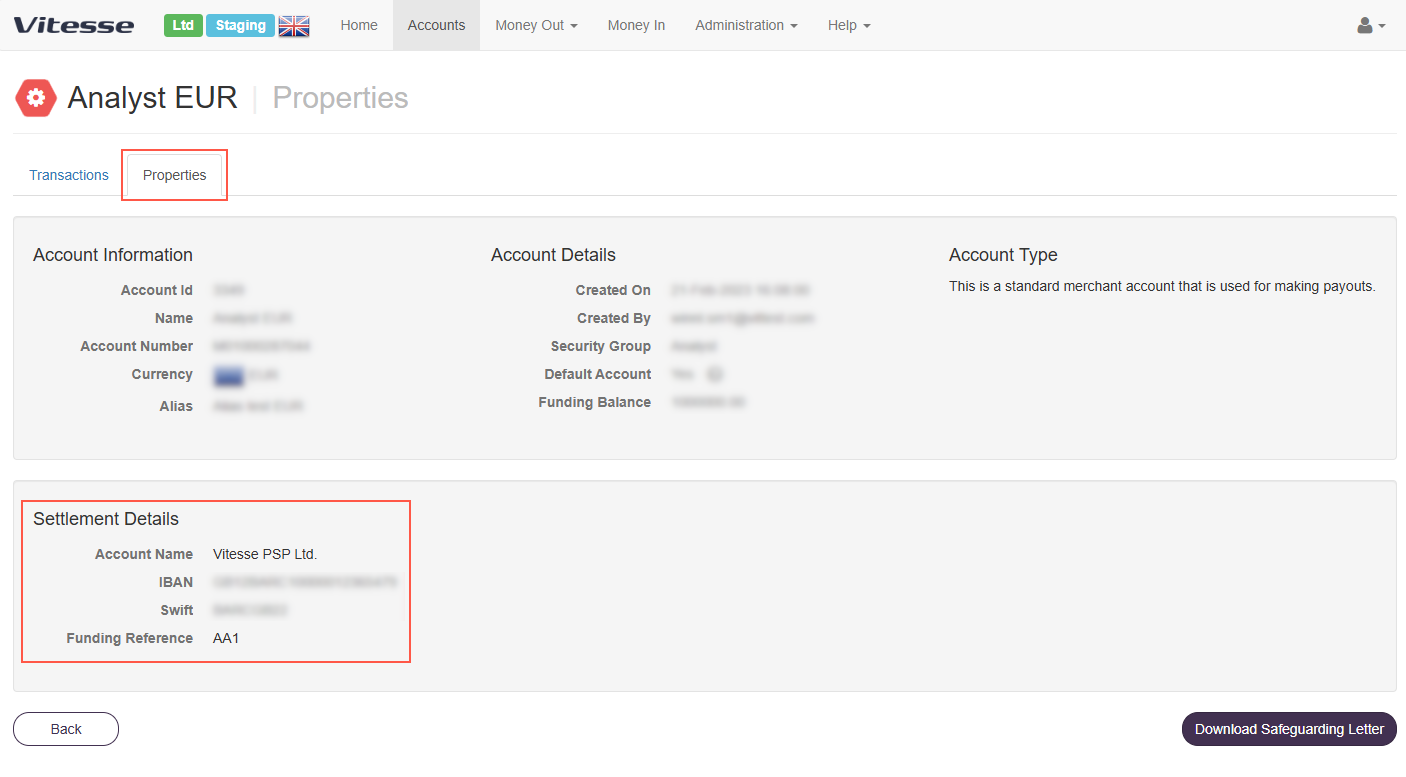
On the Properties tab, locate the Settlement Details section.
This section contains:- The dedicated bank details, also known as Standard Settlement Instructions (SSI)
- The Funding Reference, also known as the UI Code
Instruct your bank transfer
- Initiate the transfer from your corporate bank using the dedicated bank details shown in MAS.
- If funding Direct, include a clear Payment Reference to support your internal reconciliation.
- If funding Indirect, structure the payment reference as follows:
- Insert the Funding Reference at the beginning of the payment reference
- Add a space
- Then add your internal reconciliation text
For example:
AB9 PYMT VITESSE BINDER XYZ123
whereAB9is the Funding Reference, and the remaining text supports reconciliation.
If sending funds via SWIFT, select OUR as the fee type. This ensures Vitesse receives the full funding amount without deductions.
If the Funding Reference is missing or incorrect when using Funding Indirect, the funds are placed in an Unapplied Funds account until the issue is resolved. If the expected funds do not appear in your Vitesse account, contact Vitesse immediately so we can investigate and correctly allocate the fund.
Updated 3 months ago